
Before Implementing our very own MCP server let's first understand what MCP really is
Model Context Protocol is a way to let an AI agent or LLM to talk to some external service/tools to get the work done. Just like http, http is also a protocol to communicate on the internet similary MCP is used by LLMs to discover and use tools, resources, and prompts
MCP was introduced by Leading AI research and develpoment company Anthropic
Lets understand MCP with an example
Claude with Apify : Claude cannot directly scrape websites on its own. However, Apify can expose web-scraping capabilities through MCP. Claude can discover these tools, decide when they are needed, invoke them through MCP, and use the returned data to complete the user's task.
User:
"Get me the prices of iPhone 17 from these 5 websites."

    ↓

Claude:
"I need a scraping tool."

    ↓ (MCP)

Apify MCP Server
└─ scrape_website(url) //tool-1
└─ extract_product_data(...) //tool-2

    ↓

Returns structured data

    ↓

Claude: understands data and show
"Here are the prices across the websites..."
💡 Point to remember : MCP allows an agent to access external tools and data sources, enabling it to perform tasks that would be difficult or impossible using only its pretrained knowledge.
Let's create our very own MCP server and let claude code utilize it
Core MCP functions => We Will create an mcp-stats server which will expose tools like get_memory_usage, get_top_processes, get_network_stats, etc. in short a server which will let our agent know the stats of our local system.
so that if we ask which process is consuming highest ram it can answers it via these MCP tools.
Step-0 : Prerequisite
-> Claude cli or Claude Code installed(or any other Agent)
->python installed
Step-1 : Create the project and install dependencies
mkdir ~/mcp-stats
cd ~/mcp-stats
python3 -m venv venv
source venv/bin/activate
pip install "mcp[cli]" psutil
Step-2 : Create server.py
copy these contents inside the server.py file
import psutil #cross-platform system stats (CPU, RAM, disk, network, processes)
import platform
import time
from datetime import timedelta
from mcp.server.fastmcp import FastMCP

#This creates the server instance named "local-stats" — the name Claude uses
#to identify it in the MCP config.
mcp = FastMCP("local-stats")


#@mcp.tool()
#Decorating any function with @mcp.tool() registers it as a callable tool that
#Claude can invoke. FastMCP automatically:

#Reads the function name → becomes the tool name
#Reads the docstring → becomes the description Claude uses to decide when to call it
#Reads the type hints → generates the JSON schema for inputs/outputs

@mcp.tool()
def get_cpu_usage() -> dict:
    """Get current CPU usage across all cores."""
    per_core = psutil.cpu_percent(interval=1, percpu=True)
    overall = round(sum(per_core) / len(per_core), 1)
    freq = psutil.cpu_freq()
    return {
        "overall_percent": overall,
        "per_core_percent": per_core,
        "core_count": psutil.cpu_count(),
        "frequency_mhz": round(freq.current, 1) if freq else None,
    }


@mcp.tool()
def get_memory_usage() -> dict:
    """Get RAM and swap memory usage."""
    ram = psutil.virtual_memory()
    swap = psutil.swap_memory()
    return {
        "ram": {
            "total_gb": round(ram.total / 1e9, 2),
            "used_gb": round(ram.used / 1e9, 2),
            "free_gb": round(ram.available / 1e9, 2),
            "percent_used": ram.percent,
        },
        "swap": {
            "total_gb": round(swap.total / 1e9, 2),
            "used_gb": round(swap.used / 1e9, 2),
            "percent_used": swap.percent,
        },
    }


@mcp.tool()
def get_disk_usage() -> list:
    """Get disk usage for all mounted partitions."""
    results = []
    for part in psutil.disk_partitions():
        try:
            usage = psutil.disk_usage(part.mountpoint)
            results.append({
                "mountpoint": part.mountpoint,
                "device": part.device,
                "total_gb": round(usage.total / 1e9, 2),
                "used_gb": round(usage.used / 1e9, 2),
                "free_gb": round(usage.free / 1e9, 2),
                "percent_used": usage.percent,
            })
        except PermissionError:
            pass
    return results


@mcp.tool()
def get_network_stats() -> dict:
    """Get cumulative network I/O statistics since last boot."""
    net = psutil.net_io_counters()
    return {
        "bytes_sent_mb": round(net.bytes_sent / 1e6, 2),
        "bytes_recv_mb": round(net.bytes_recv / 1e6, 2),
        "packets_sent": net.packets_sent,
        "packets_recv": net.packets_recv,
    }


@mcp.tool()
def get_top_processes(limit: int = 10, sort_by: str = "cpu") -> list:
    """
    Get top processes sorted by resource usage.
    sort_by: 'cpu' or 'memory'
    limit: number of processes to return (default 10)
    """
    procs = []
    for p in psutil.process_iter(["pid", "name", "cpu_percent", "memory_percent", "status"]):
        try:
            procs.append(p.info)
        except (psutil.NoSuchProcess, psutil.AccessDenied):
            pass
    key = "cpu_percent" if sort_by == "cpu" else "memory_percent"
    return sorted(procs, key=lambda x: x.get(key) or 0, reverse=True)[:limit]


@mcp.tool()
def get_system_info() -> dict:
    """Get general system information: OS, uptime, hostname, load averages."""
    boot_time = psutil.boot_time()
    uptime_seconds = time.time() - boot_time
    uptime = str(timedelta(seconds=int(uptime_seconds)))
    load = psutil.getloadavg()
    return {
        "hostname": platform.node(),
        "os": f"{platform.system()} {platform.release()}",
        "architecture": platform.machine(),
        "python_version": platform.python_version(),
        "uptime": uptime,
        "load_avg_1_5_15": [round(x, 2) for x in load],
        "cpu_count": psutil.cpu_count(),
    }


if __name__ == "__main__":
    mcp.run()  # stdio transport by default — Claude Code manages the process
Step-3 : Register with Claude Code
Here we tell claude to add this MCP in your MCPs registry
claude mcp add --scope user local-stats -- python3 /home/YOUR_USERNAME/{path_to_your_mcp_server}/mcp-stats/server.py--scope user — makes it available in every Claude Code session globally
Step 4 : Test it
in your terminal open a fresh claude session and list the MCPs with following commands
claude #press enter on "I trust this folder"
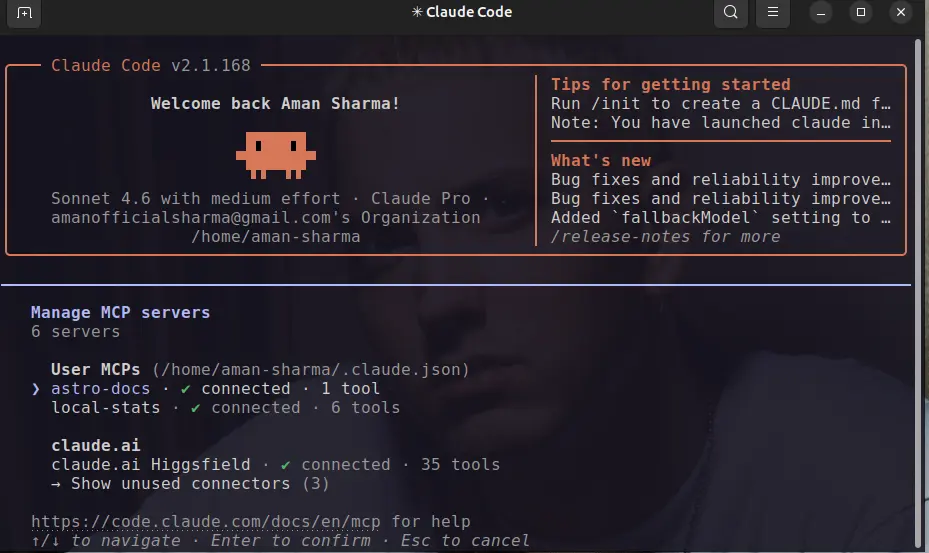
/mcp  #this will list connected MCPs
After listing your MCPs you will be able to see the connected MCPs with your claude, just like the below output - we can see local-stats -> connected ✅
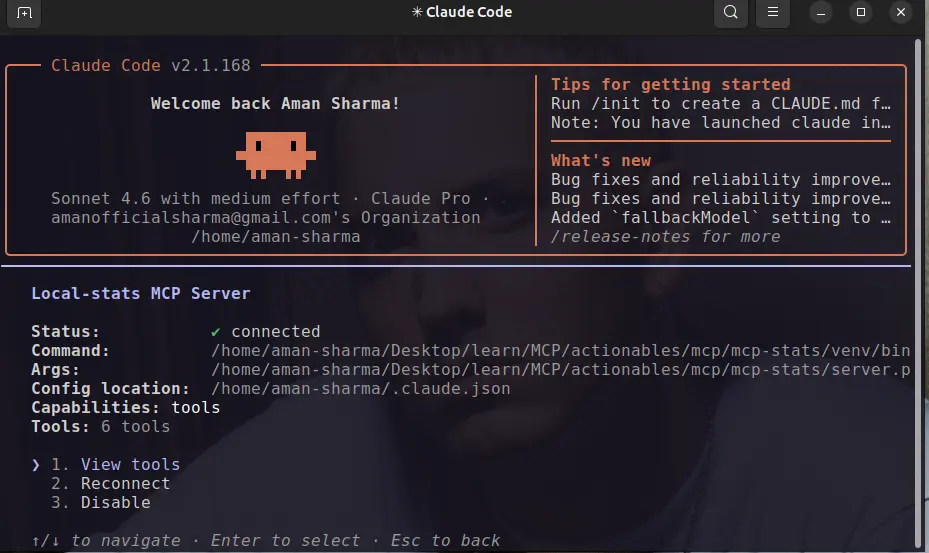
Go insdie the local-stats MCP, here you can see options to View tools, Reconnect and Disable the MCP
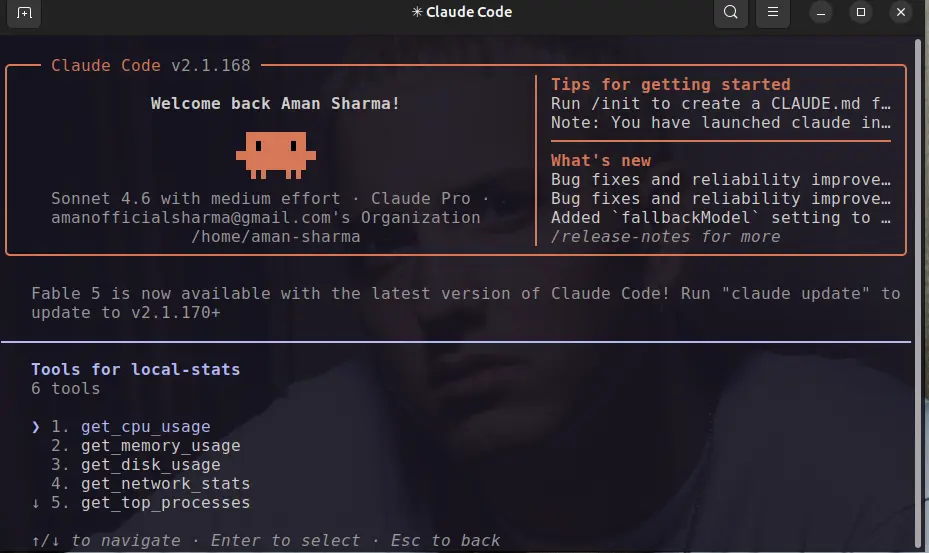
Go inside the View tools to see which tools are available for claude to use from our local MCP server, and here we will be able to see all 6 tools we have created with our python server.
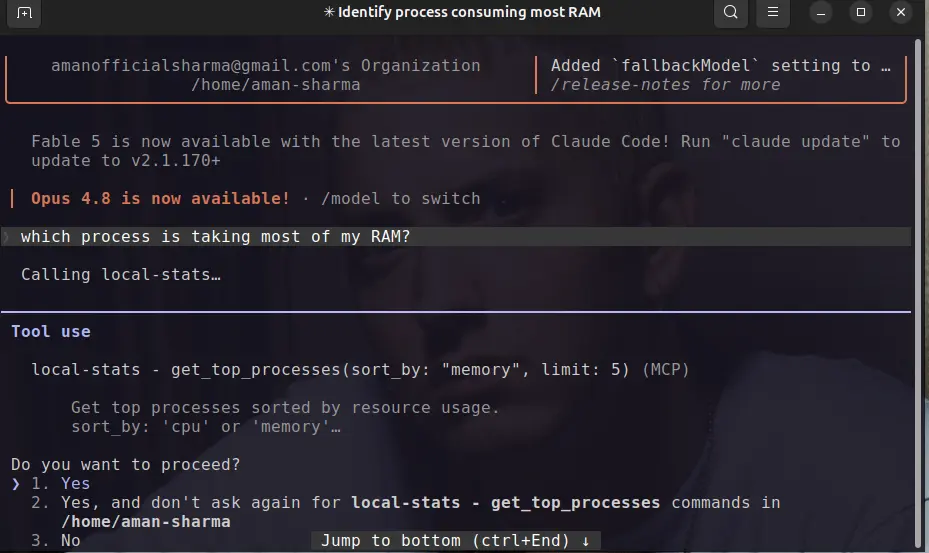
Now the Real test, ask claude which process is taking most of my RAM?
it will ask you to allow permission for the usage of get_top_processes tool, if you see this happening then it's a green light as claude is able to find the correct tool for answering your question 🤩.
Tap Yes and proceed
And Finally you will be able to see the correct output 💫
BTS - when you tap yes on the tool usage, claude will spin up your local-stat python server for a brief moment and call the get_top_processes tool get the output, kill the server, make the output presentable to user in table format
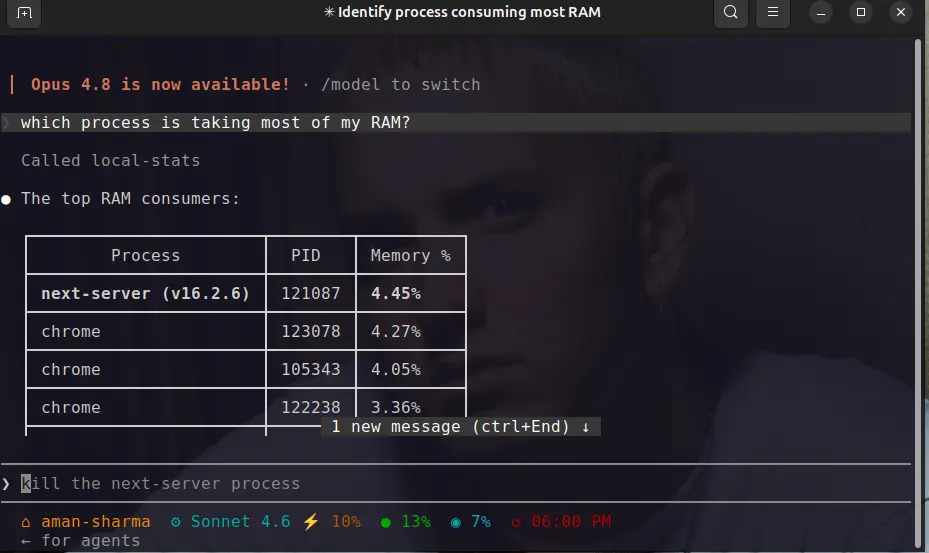
💡 Claude Smartness : our tool was just returning the python list but claude fetch the list and convert it into table to better view the process
My Final Thoughts
MPC servers have infinite potential and possibilites, we can let agent to anything we can think of from sending db queries to write emails and save in draft for us to send, even we can use agents to hack systems by providing it the necessary tools.
Enjoy building 🚀